Game Studio

About

The Game Studio is a creative and experimental space provided by the library. It supports game development, virtual reality, AI exploration, and interactive experiences for students and faculty.


Games

DKU Library Game Studio offers nearly 50 curated titles, primarily on Steam (Windows) with League of Legends via Riot. Check full list of games here.

The collection spans narrative and exploration, action RPGs and adventures, space and flight, strategy, management and sandbox, racers, and team shooters. Many are suitable for teaching and research in areas such as language and narrative, systems thinking, physics and astronomy, and social themes. Selected titles support specialized peripherals (e.g., flight stick). 

Equipment

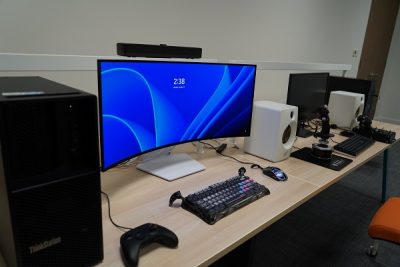
High-Performance Workstations

  • Workstation 1: Lenovo ThinkStation P3 — Intel Core i9-14900K CPU, 64 GB RAM, 4 TB SSD, NVIDIA 24GB  GPU

  • Workstation 2: Dell T3680 (ThinkStation P3 Series) — Intel i7-14700 CPU, 16 GB RAM, 2 TB SSD, NVIDIA 32 GB GPU

Consoles & Simulation

  • Xbox Controller × 1

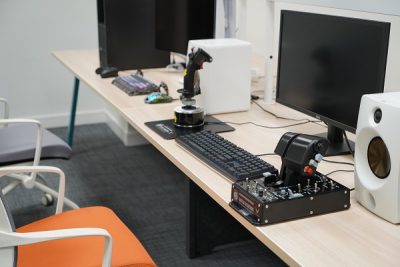
  • Flight Simulator Set (Thrustmaster A10C HOTAS Warthog Flight Stick)

  • JBL CM500 Sound System

Furniture & Displays

  • Large Monitor × 1

Game Development Software

Software
Description
Installed on
Unity
Cross-platform game engine & development platform
Workstation No. 1 & No. 2
Unreal Engine
Game engine for high-quality 3D production
Workstation No. 1 & No. 2
Godot
Cross-platform game development platform
Workstation No. 1 & No. 2
Itch
Indie game sharing platform
Workstation No. 1 & No. 2
Blender
3D modeling software
Workstation No. 1 & No. 2
Visual Studio (VS) Code
Programming IDE for a wide variety of languages
Workstation No. 1 & No. 2
PyCharm
Python programming language IDE
Workstation No. 1 & No. 2

Usage Guidelines

       Reservation:

       Book a session through Calendly

       Walk-ins are not allowed currently.

       Opening Hours:

       Monday–Friday: 9:00-12:00, 14:00-17:00

       Closed on official campus holidays


       Requesting new software

       Users can request new games or software through this survey. A team member will review the request and handle purchasing/download if accepted.


       Policies:

       Session Duration

       Public users may reserve up to two 1.5 hour time slots per day.  

       Research and course-related projects may request extended access with prior approval. Up to 6 hours per day with approval for academic projects.

       Equipment Care

       All equipment (controllers, headsets, consoles, PCs, etc.) must be returned to the designated area after use.

       Report any technical issues immediately to staff. Do not attempt to repair or modify equipment.

       No software installation or removal without prior approval.

       Conduct

       Users must maintain a respectful environment. Harassment, cheating, or disruptive behavior will result in suspension of access.

       No food allowed near equipment. Drinks must have secure lids.

       Users must leave the space clean and tidy for the next group.

       Access & Security

       Only registered users may access the studio.

       Users must check in and out through the booking system or at reception.

       Fair Use

       Equipment is first-come, first-served within reservations.

       Users should share multiplayer setups fairly if others are waiting.

       Compliance

       All activity must comply with campus IT and network policies.

       Unauthorized downloads, piracy, or attempts to bypass security are prohibited.

Contact

Systems Librarian:

Xueying Cheng / lib_tech@dukekunshan.edu.cn

Student Assistants:

Hailee Cunningham / hailee.cunningham@dukekunshan.edu.cn

Sean Allen Siegfreid Bugarin / seanallensiegfreid.bugarin@dukekunshan.edu.cn