Signing In to ArcGIS

Table of Contents

This guide provides instructions for signing in ArcGIS Online using your Duke NetID. ArcGIS Online is a web-based mapping system compatible with Windows, macOS, and Linux systems.

Signing in using NetID

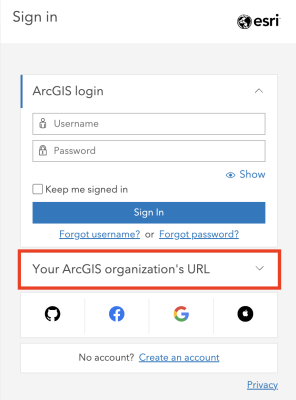
1. Open ArcGIS Online in your browser and click Sign In, located either in the center or in the top right corner.

2. Select Your ArcGIS organization’s URL.

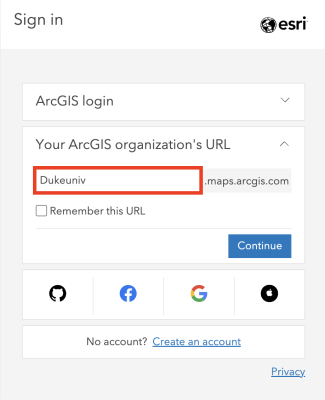
3. Type in ‘Dukeuniv’ in the box and click Continue.

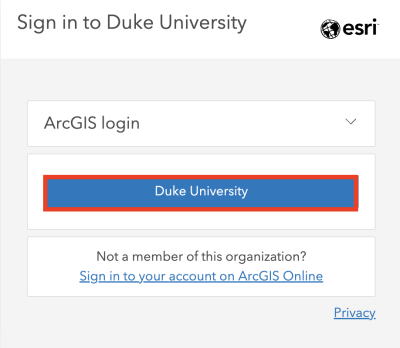
4. Click Duke University.

5. Log in through the Duke login page using your NetID and password.

You’re now signed in to ArcGIS Online!

Learning Resources

ArcGIS Online offers a wide range of tools for visualizing and analyzing geospatial data, and this tutorial only covers some of them. You are encouraged to continue exploring and experimenting with the tool. For further learning, the following resources are recommended:

Troubleshooting

If you encounter any technical issues installing or using ArcGIS Online, Esri Community is a good place to seek solutions.

If the problem persists or your issue is not addressed there, please contact the Data and Visualization Librarian, Siti Lei (siti.lei@dukekunshan.edu.cn) for further support.